API rate limits and request ids
How many requests the VPSNine API takes a minute, the X-RateLimit headers, handling 429 with Retry-After, and using X-Request-Id when you ask us about a call.
The VPSNine API takes 60 requests a minute per token and 120 a minute per account across all its tokens. Past either limit it answers 429 rate_limited with a Retry-After header in seconds; every answer also carries an X-Request-Id that lets us find that exact request if you ask us about it.
What you need
- An API token and
curl. The examples read the token fromVPS9_TOKENand the base address fromAPI:
export VPS9_TOKEN="$(cat ~/.vps9-token)"
export API=https://my.vpsnine.com/api/v1
The limits
| What | Limit | Counted per |
|---|---|---|
| Any request with a token | 60 a minute | token |
| Any request with a token | 120 a minute | account, all tokens together |
GET /prices and GET /status (no token) |
60 a minute | address |
Orders (POST /servers) |
10 an hour, failed tries included, panel orders too | account |
| Reverse DNS changes | 10 an hour | account |
| Starting rescue mode | 10 an hour | account |
| Webhook test events, and redeliveries | 5 a minute each | account |
A minute is a fixed window that starts with your first request in it, not a rolling one. More tokens don't buy more requests: the account limit is shared.
Read where you stand
Every answer to a request with a token has three headers:
curl -sS -o /dev/null -D - -H "Authorization: Bearer $VPS9_TOKEN" "$API/me" | grep -i '^x-'X-Request-Id: req_a3o27yn6jdcya34oexlef5bg
X-RateLimit-Limit: 60
X-RateLimit-Remaining: 56
X-RateLimit-Reset: 60| Header | Meaning |
|---|---|
X-RateLimit-Limit |
60, or 120 once the account's limit is the nearer one |
X-RateLimit-Remaining |
Requests left in this window |
X-RateLimit-Reset |
Seconds until the window starts again |
When Remaining gets low, slow down rather than waiting for the 429. A script that polls a server every 5 seconds uses 12 requests a minute, which leaves room for everything else.
When you get a 429
The answer looks like this, with Retry-After set to the seconds until the window resets:
HTTP/1.1 429 Too Many Requests
X-RateLimit-Limit: 60
X-RateLimit-Remaining: 0
X-RateLimit-Reset: 60
Retry-After: 60

{"error":{"code":"rate_limited","message":"Too many requests: 60 a minute per token.","requestId":"req_yk6yypmf4w2uh5dmylbyqssl"}}
A 429 means nothing happened, so the same request is always safe to send again after the wait. 500, 502, 503 and 504 are worth retrying too, with care for a POST: see Idempotent orders.
In a shell script, this function waits for Retry-After and tries again, up to five times. It prints the body and fails on any other error:
# call PATH [curl options]: one API request, waiting and trying again on 429, 500, 502, 503 and 504 (5 tries).
call() {
  local path=$1; shift
  local headers body status wait
  headers="$(mktemp)"
  for attempt in 1 2 3 4 5; do
    body="$(curl -sS -D "$headers" -w '\n%{http_code}' -H "Authorization: Bearer $VPS9_TOKEN" "$@" "$API$path")"
    status="${body##*$'\n'}"; body="${body%$'\n'*}"
    case "$status" in
      429|500|502|503|504)
        wait="$(awk 'tolower($1) == "retry-after:" { print $2 + 0 }' "$headers")"
        wait="${wait:-$((2 ** attempt))}"
        echo "got $status, waiting ${wait}s (try $attempt)" >&2
        sleep "$wait" ;;
      *) rm -f "$headers"; printf '%s\n' "$body"; [ "$status" -lt 400 ]; return ;;
    esac
  done
  rm -f "$headers"; printf '%s\n' "$body"; return 1
}

call /me | jq -r .email
The same in Python with requests:
import os, time
import requests

API = os.environ.get("VPS9_API_URL", "https://my.vpsnine.com/api/v1")
session = requests.Session()
session.headers["Authorization"] = f"Bearer {os.environ['VPS9_TOKEN']}"
RETRY = {429, 500, 502, 503, 504}


def call(method: str, path: str, **kwargs) -> requests.Response:
    """One API request; waits and tries again on 429 and 5xx, up to 5 tries. Don't use it for POST /servers without an Idempotency-Key."""
    for attempt in range(1, 6):
        res = session.request(method, API + path, timeout=30, **kwargs)
        if res.status_code not in RETRY or attempt == 5:
            return res
        wait = int(res.headers.get("Retry-After", 2 ** attempt))
        print(f"got {res.status_code} (request {res.headers.get('X-Request-Id')}), waiting {wait}s")
        time.sleep(wait)
    return res


res = call("GET", "/me")
print(res.status_code, res.headers["X-RateLimit-Remaining"], "left this minute")
We ran both against a local copy of the API until it answered 429: each waited the 60 seconds and then got its answer. The vps9 CLI doesn't retry a 429 on its own; it stops with the message and the request id. The TypeScript SDK retries for you.
Request ids
Every answer from /api/v1 has an X-Request-Id header: req_ and 24 letters and digits. Errors repeat it in the body as error.requestId. We log each request under its id with the route, the status and how long it took, never your token or what you sent, so the id is all we need to find a call.
Log it next to anything that goes wrong in your own code, and quote it in a support ticket. The CLI prints it under every API error:
vps9: Another action is still running on this server. Wait for it to finish: wait for it to finish, then try again
vps9: request id req_zl6db5dcag24ifpqaqyvd67k (quote it if you contact support)
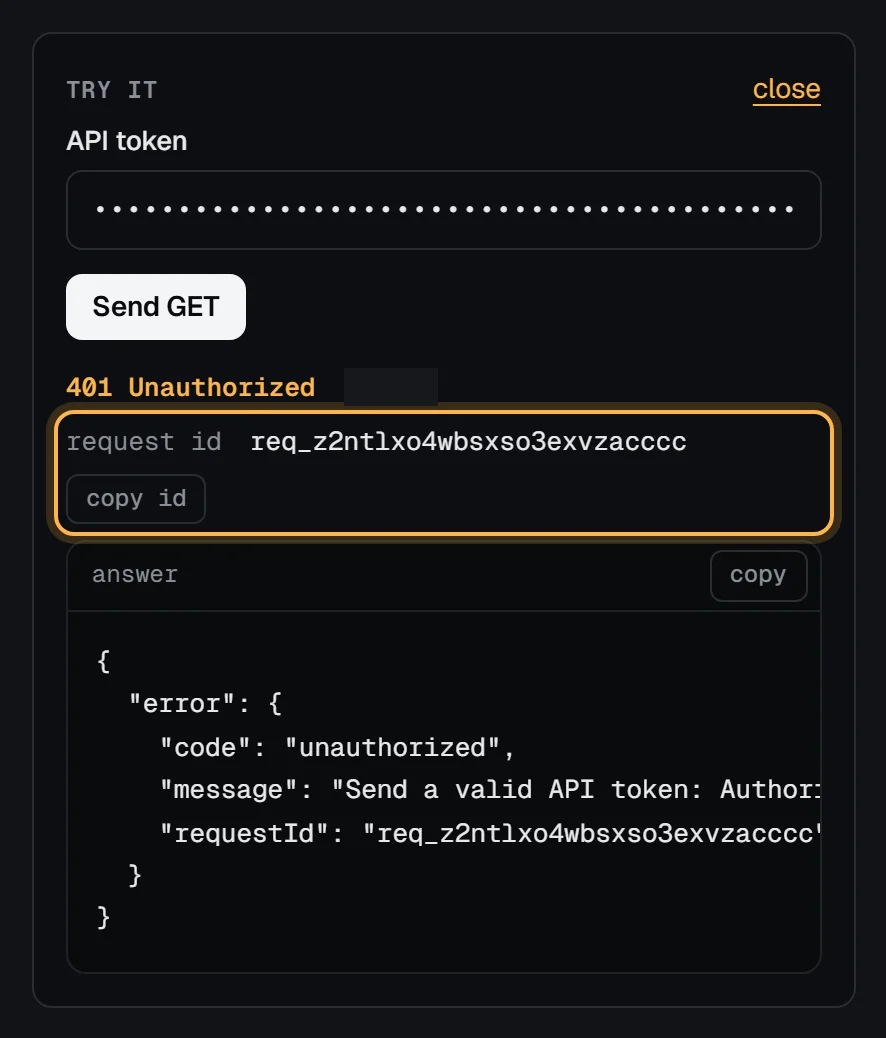
The Try it panel in the API reference shows it with a copy button:
An activity row for anything a token changed notes its request id as well, under Account > activity in the panel.
Troubleshooting
429 when one script is well under 60 a minute. Another token on the same account is busy: the account limit of 120 is shared. Look at last used on the token list to find it.
429 rate_limited on POST /servers after a few tries. That's the 10 orders an hour, which counts failed tries and orders placed in the panel. Fix the order's error before you send it again, and wait for the hour to pass.
A loop that polls for an action to finish runs out of requests. Poll every 5 seconds, not every second; most actions take under a minute. Or use webhooks for server.ready and snapshot.completed instead of polling.
Next steps
- Idempotent orders with Idempotency-Key
- Use curl and jq with the VPSNine API
- The developer hub and the plans your scripts will run against.