Idempotent orders with Idempotency-Key
Send an Idempotency-Key header with POST /servers so a retry after a timeout returns the order you already placed instead of ordering a second server.
To order a server through the VPSNine API without risking a duplicate, send an Idempotency-Key header with POST /servers and keep the same key until you get an answer. If the request times out and you send it again with that key, the API answers with the order it already placed instead of placing a second one.
What you need
- A read-and-write API token and a confirmed email address.
- Orders open at launch. Until then
POST /serversanswers403 staff_only.
Why orders need it
A request can time out after the API has done the work: the order went through, but the answer never reached you. For most endpoints that doesn't matter, because reading, replacing (PUT) and deleting end the same way however many times you send them. An order is different: sending it twice would order two servers and make two invoices.
With a key, the API looks the key up before anything else. A key it has seen, with the same order, gets the first answer back, even if you've since reached the limit of 3 unpaid orders or the plan has gone off sale.
The rules for a key
- 1 to 60 characters: letters, digits, dots, colons, dashes and underscores. A UUID works.
- Case matters:
Order-Aandorder-aare two keys. - One key, one order, for good. The key stays tied to the order it placed, so never reuse it for a new one.
- The same key with a different order (another plan, hostname, app, packages or setup script) is refused with
422 idempotency_key_reused, and nothing is ordered. - Only
POST /serversreads the header; other endpoints ignore it.
A good key names the thing you're ordering, or is a fresh UUID you keep until you have an answer. A key like web-4-2026-10-21 also stops a person running the same script twice from ordering twice.
With curl
ORDER_KEY="$(uuidgen)"   # keep it until you have an answer
jq -n --arg k "key_…" '{plan: "budget", image: "debian-12", hostname: "worker-1", sshKeyIds: [$k]}' |
  curl -sS --retry 5 --retry-all-errors -X POST \
    -H "Authorization: Bearer $VPS9_TOKEN" -H "Content-Type: application/json" \
    -H "Idempotency-Key: $ORDER_KEY" --data @- \
    https://my.vpsnine.com/api/v1/servers
--retry-all-errors makes curl send the request again on a timeout or a dropped connection, with the same header each time, so retrying is safe.
With Python
import os, time, uuid
import requests

API = os.environ.get("VPS9_API_URL", "https://my.vpsnine.com/api/v1")
HEADERS = {"Authorization": f"Bearer {os.environ['VPS9_TOKEN']}"}


def order_server(order: dict) -> dict:
    key = str(uuid.uuid4())  # one key for this order, kept across every retry
    for attempt in range(1, 6):
        try:
            res = requests.post(f"{API}/servers", json=order, headers={**HEADERS, "Idempotency-Key": key}, timeout=30)
        except (requests.ConnectionError, requests.Timeout):
            res = None  # no answer: it may or may not have worked, so ask again with the same key
        if res is not None and res.status_code not in (429, 500, 502, 503, 504):
            body = res.json()
            if not res.ok:
                raise RuntimeError(f"{body['error']['code']}: {body['error']['message']} ({body['error']['requestId']})")
            return body
        time.sleep(int(res.headers.get("Retry-After", 2 ** attempt)) if res is not None else 2 ** attempt)
    raise RuntimeError(f"no answer after 5 tries; try again later with Idempotency-Key {key}")


placed = order_server({"plan": "budget", "image": "debian-12", "hostname": "worker-1", "sshKeyIds": [os.environ["KEY_ID"]]})
print(placed["invoice"]["number"], placed["invoice"]["status"], placed["payUrl"])
With the SDK and the CLI
The TypeScript SDK sends a key on every orderServer call and reuses it on its own retries. Pass your own when your code might run the same order again, for example a job that restarts:
await vps9.orderServer(
  { plan: "budget", image: "debian-12", hostname: "worker-1", sshKeyIds: ["key_…"] },
  { idempotencyKey: "worker-1-2026-10-21" },
);
vps9 servers create makes a key for every order. If the answer is lost, it prints the key and the command to repeat. To choose the key yourself:
vps9 servers create --plan budget --image debian-12 --hostname worker-1 --key key_… \
  --idempotency-key worker-1-2026-10-21
Run that twice and the second run prints the same invoice number as the first.
In the API reference
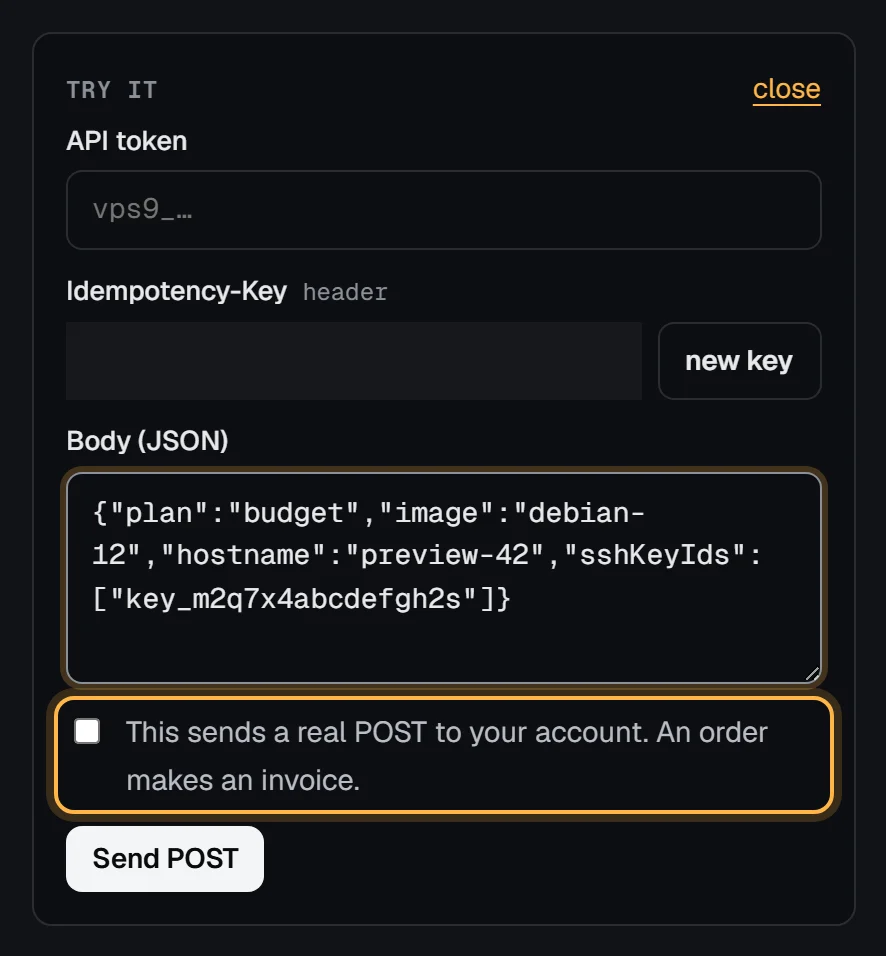
The Try it panel for Order a server has an Idempotency-Key field with a new key button, and asks you to tick a box before it sends, because an order is real:
Check it worked
Send the same order twice with one key. Both answers carry the same order.id and invoice.number, and GET /servers lists the server once. We checked this against a local copy of the API: the second answer was the first order, and a third try with a different plan got 422 idempotency_key_reused.
Troubleshooting
422 idempotency_key_reused: "This Idempotency-Key was already used for a different order. Use a new key for a new order." The key belongs to an order with different details. Either you changed the order on retry (send exactly the same body), or you reused a key for a new server (make a new key).
422 invalid_idempotency_key: "Idempotency-Key must be 1 to 60 letters, digits, dots, colons, dashes or underscores." Spaces, slashes and other characters aren't allowed. A UUID or a name like web-1-2026-10-21 works.
429 rate_limited with Retry-After: 3600. Orders are limited to 10 tries an hour per account, failed ones and panel orders included. A retry that finds its earlier order is answered before that check, so it never uses up a try; only new keys do. Wait the hour rather than switching keys.
Next steps
- Rate limits and request ids
- What happens when you order
- Preview servers per pull request, which orders with a key per run.
- The plans and prices an order can name.